


Zocdoc - Find and book doctors
4.87.33K Reviews
App Specs
- Version
- 3.253.0
- Updated On
- License
- Free
- Downloads
- 1,000,000+
- Developer
- Zocdoc, Inc.
- Categories
- Medical
- Platform
- Android, iOS
Screenshots
 Analysis by AppCompare
I think Zocdoc is most useful when the hard part is not deciding whether to seek care, but finding a suitable doctor and a workable appointment without a string of phone calls. It brings search, insurance filters, patient feedback, and visible appointment openings into one place. That convenience is real, though I’d treat the app as a way to find and book care—not as a substitute for checking the details that matter to you before you go.
Where the app helps most
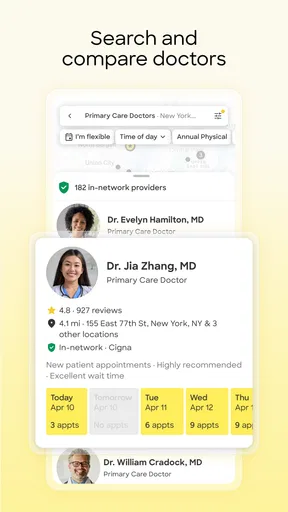
For someone new to an area, changing insurance, or looking for a specialist, starting with a filtered search can be less frustrating than opening a general map and calling clinics one by one. You can narrow the choices by the kind of care you need and your insurance, then compare profiles and reviews before choosing a time. That sequence is practical: it lets you rule out obvious mismatches before investing effort in a booking.
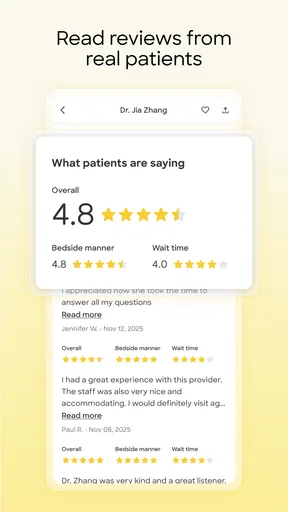
A useful way to approach the results is to treat them as a shortlist rather than a final recommendation. Reviews can show patterns in how patients describe their experiences, but they cannot tell you whether a clinician is right for your particular health concern. I’d read several comments, look for details that matter to me—such as communication or appointment logistics—and then weigh those alongside the practical fit of location, coverage, and availability.
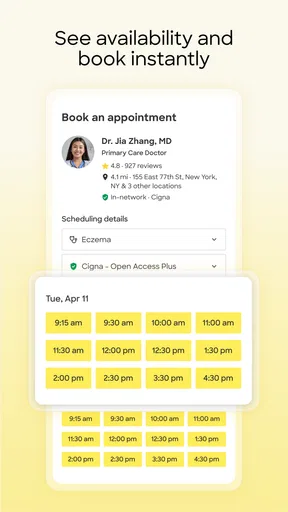
There’s also a small but worthwhile planning benefit to seeing openings while you search. If your schedule is tight, you can compare the available times against work, childcare, or travel rather than calling a clinic and hoping the first offered slot works. If you have flexibility, checking more than one suitable provider may help you find an appointment that fits sooner. The trade-off is that a convenient time should not outweigh whether the provider and coverage details are actually right for you.
A more careful booking routine
I would use the insurance filter early, but I wouldn’t stop there. Insurance networks and plan details can be confusing, so before confirming an appointment, make sure the plan shown is the one you currently use and check any details the clinic asks you to provide. If you’re booking for a family member, take extra care to use that person’s relevant information rather than assuming your own search settings apply to them.
For a first visit, it’s sensible to note what you want help with and have the information the practice may need ready. The app can make the appointment easier to arrange, but it does not remove the ordinary preparation involved in seeing a clinician. I’d also keep the appointment confirmation accessible and check the time and location again before setting out; a reminder is helpful, but it is not a replacement for your own calendar or for reading the practice’s instructions.
Consider a realistic weekday situation: you wake up with a concern that needs a routine appointment, but you cannot spend your lunch break waiting on hold. You can search for the relevant kind of doctor, compare nearby options that accept your insurance, read a few patient reviews, and choose a listed opening that works with your day. That can turn a task you were putting off into a booking you can complete in a short break. If the problem feels urgent or severe, though, appointment search is the wrong first step; use an appropriate urgent or emergency care route instead.
Worth Reading Before You Choose

EA SPORTS FC Mobile 26 Is a Bigger Football Game, but It Takes Time

Flipboard Shows What News Apps Must Do Beyond the Feed

Switching to Android Auto Means Rethinking Your Driving Routine

Google Calendar Makes a Crowded Week Easier to Manage

Ludo King Makes the Most of the Minutes Between Plans

Baby Panda World Brings Quick Play to Modern Phones, but Its Game Library Feels Busy
How it compares with calling or browsing elsewhere
Calling a practice directly can still be better when you have a complicated question, need to explain a particular situation, or want to confirm a detail that is not clear in a profile. A clinic’s own office can answer questions about its process in a way a search screen cannot. On the other hand, making several calls just to compare ordinary appointment times is exactly the kind of legwork Zocdoc can reduce.
General map searches are useful for seeing what is nearby, but they may leave you to work out insurance fit, reviews, and booking availability separately. Zocdoc’s advantage is bringing those decisions closer together. It is not a guarantee that every relevant provider will appear or that every listed detail settles your coverage, so I would use it alongside a direct check when the choice has financial or practical consequences.
Who should use it—and who may not need it
I’d recommend the app to people who are comfortable making routine appointments online and want a quicker way to compare clinicians, especially when they are searching for a new provider or trying to fit care around a busy schedule. It can also be handy when you know the specialty you need but do not yet know which nearby practice to contact.
It may be less useful if you already have a trusted clinician and prefer to arrange every visit through that office, or if your situation calls for a conversation before you can choose the right appointment. Someone seeking immediate help should not rely on browsing routine openings. And if you prefer to make decisions only after speaking with a person, calling the practice directly may feel more reassuring than booking through an app.
As a medical app from Zocdoc, Inc., Zocdoc is free, rated for Everyone, and has a 4.8 average from around 40,000 ratings. It has been available since July 25, 2011, has over one million installs, and its current version is 3.221.0, with Android 8.0 as the minimum system requirement. Those figures suggest an established service, but the practical question is whether its local search results and booking options suit your needs.
What’s the Buzz About Zocdoc?
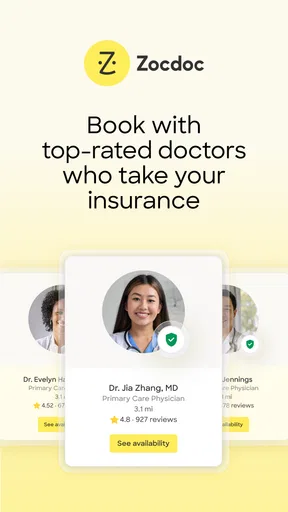
So, you might be wondering, what exactly does Zocdoc do? Well, it’s like having a personal assistant for your healthcare needs. This app allows you to search for doctors and book appointments online. Gone are the days of endless phone calls and waiting on hold. You can now do it all with a few taps on your smartphone. The app covers a wide range of specialties, so whether you need a dentist or a dermatologist, you’re in good hands.
Getting Started
Signing up is a breeze. Just download the app, create an account, and you’re set. The interface is super user-friendly, which is a big plus. You can search for doctors based on your insurance plan, location, and the type of specialist you need. Plus, it provides a sneak peek into other patients’ experiences with reviews and ratings. It’s like Yelp, but for doctors!
Features That Stand Out
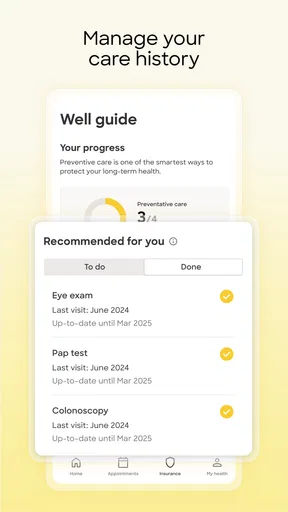
One of the coolest features of Zocdoc is the ability to book appointments instantly. You can see the available slots in real-time and choose one that fits your schedule. No more back-and-forth with the receptionist! Also, the app sends you reminders for your appointments, which is perfect if you’re as forgetful as I am.
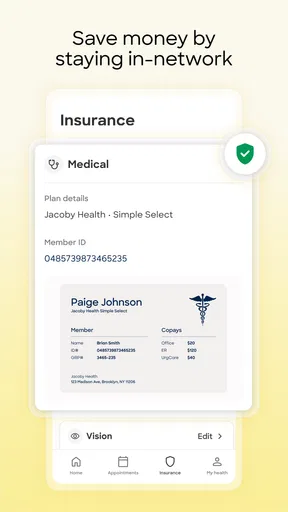
Another handy tool is the insurance checker. You can filter doctors based on your insurance coverage, which saves a ton of hassle. It also helps you avoid those nasty surprise bills. Nobody likes those!
Real Talk: My Experience
Using Zocdoc was a game-changer for me. I needed to see a specialist and was dreading the process of finding one. With Zocdoc, I booked an appointment in under five minutes. The best part? I could do it while sipping my morning coffee. The app’s reminders ensured I didn’t miss my appointment, and the doctor I found was top-notch.
The reviews from other patients gave me peace of mind, knowing I was in good hands. Plus, the convenience of booking online saved me so much time. It’s like having a healthcare concierge in your pocket!
In conclusion, if you’re looking to simplify your healthcare routine, Zocdoc is worth checking out. It’s packed with features that cater to today’s fast-paced lifestyle, and it truly makes managing doctor appointments a breeze. So, why not give it a shot? Your future self will thank you!
My verdict
That’s the case for using it: fewer calls, a clearer view of appointment options, and a convenient way to begin a search when you don’t already know which office to contact. I’d still verify important insurance and visit details with the practice, and I wouldn’t use a routine booking tool for an urgent problem. For everyday appointment-finding, though, this is a useful place to start—particularly if comparing providers and times is the part of getting care that usually slows you down.
Pros
- Easy appointment booking process.
- Wide range of specialists available.
- User-friendly interface design.
- Real-time appointment availability.
- Patient reviews for informed choices.
Cons
- Limited to participating doctors.
- Some areas have fewer options.
- In-app ads can be intrusive.
- No support for international users.
- Requires internet for full functionality.
FAQs for Zocdoc - Find and book doctors
What is Zocdoc and how does it work?
Zocdoc is a user-friendly app that helps you find and book appointments with doctors in your area. By entering your location and preferred specialty, you can browse through profiles of local healthcare providers, read patient reviews, and book appointments instantly, all through the app. It streamlines the process of finding the right doctor for your needs.
Is Zocdoc free to use for patients?
Yes, Zocdoc is completely free for patients. You can search for doctors, view their profiles, read reviews, and book appointments without any cost. The app earns revenue through fees charged to healthcare providers, ensuring that users have free access to its services.
How secure is my personal information on Zocdoc?
Zocdoc takes your privacy seriously and uses industry-standard encryption to protect your personal information. The app complies with all relevant data protection regulations to ensure that your details, including health information and appointment history, are kept secure and confidential.
Can I cancel or reschedule appointments through Zocdoc?
Yes, Zocdoc allows you to manage your appointments easily. You can cancel or reschedule directly through the app, subject to the provider’s cancellation policy. This feature provides flexibility and convenience in managing your healthcare appointments effectively.
Do I need insurance to use Zocdoc?
While you don’t need insurance to use Zocdoc, the app allows you to filter doctors based on your insurance plan. This helps you find providers within your network, ensuring that you receive care covered by your insurance policy. You can also view out-of-network options if needed.


